
Beautiful Plants For Your Interior
Beautiful Plants For Your Interior
Dive into the core of digital audio processing with an exploration of sampling frequency and bitrate. Understand the fundamental concepts behind signal conversion from analog to digital, and unravel the complexities of quantization. Master the art of achieving optimal audio quality in your projects with this article.
A signal is a measurable quantity. When a sensor detects a physical quantity, it measures and converts it into an analog or digital signal.
In the context of musical instruments, the sensor refers to the magnetic or piezoelectric pickup. It is one of the main components of your musical instrument. The pickup functions like a microphone, although it is not one. There are several types of pickups, but we will only discuss the two main technologies used in musical instruments. There are magnetic pickups, which interpret a disturbance in the magnetic field produced by plucking the strings into an electrical signal. These pickups are primarily used on electric guitars and basses. Then, there are piezoelectric pickups, which convert mechanical vibrations produced by the strings into an electrical voltage. They are installed on acoustic guitars and some bowed string instruments such as cellos.

An analog signal takes an infinite number of values that vary continuously over time. The temperature of an environment over the course of a week is an analog quantity. When copying an analog audio signal, we trie to reproduce it as faithfully as possible on a medium. These mediums are a bit outdated, including audio cassettes, phonograph cylinders, or vinyl records. The recorded amplitude of this signal gives a more or less precise representation of it.
A digital signal can only have two values: 0 or 1. It is quantized and it is a binary signal composed of 0s and 1s, called bits. The sensor detects either a 1 or a 0.
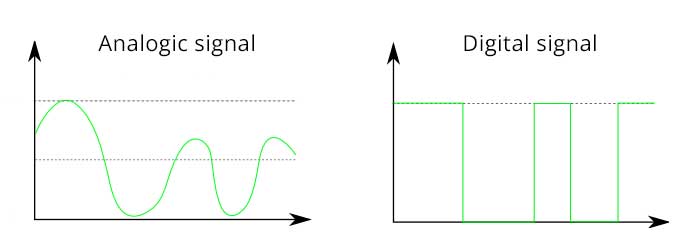
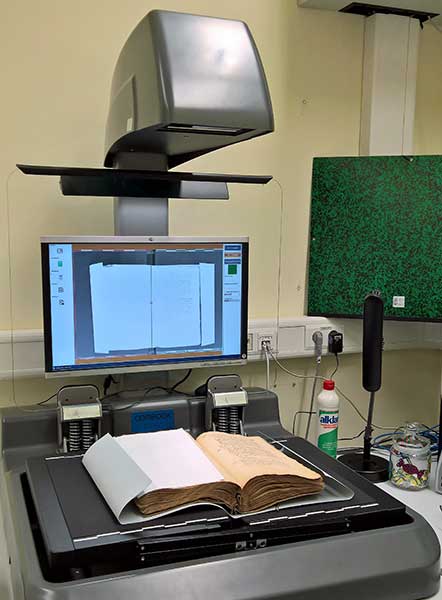
Digitization is the process of converting information from an analog signal or physical medium into understandable and processable digital data by computer devices such as computers. The process involves turning a non-digital element into a digital one. It applies to the processing of audio signals as well as the digitization of documents. In recent years, there has been much discussion of digitization concerning archives available in paper format.
Governments and businesses have implemented digitization processes for these documents using scanners to facilitate their storage and accessibility to a wider audience.
The goal of digitizing an audio signal is to obtain a digital signal from an analog one. The former consists of an infinite number of amplitudes, while the latter is defined by a finite number of values.
Digital conversion involves two steps: sampling and analog-to-digital conversion (ADC). The process is carried out using an analog-to-digital converter. It samples the signal at a certain frequency, known as the sampling frequency, and encodes these samples into a certain number of bits, referred to as quantization.
Sampling frequency in audio, also known as the sample rate, refers to the number of audio samples taken per second to represent an audio signal. It is the number of instances per unit of time that an recording device needs to transform sound into data.
To better understand, imagine analog sound as a continuous wave, and each sample represents a measurement of the height of that wave at a specific moment. The higher the sampling frequency, the higher and more precise the audio quality, as it allows for better reproduction of the original sound. However, a higher sampling frequency also means that more data is required to store the audio result, resulting in larger files.
The diagrams below show a signal sampled at different accuracies. In the first two diagrams, the signal can be faithfully reproduced because its sampling rate is substantial. However, in the latter diagrams, the collected samples are not numerous enough to properly reconstruct the original signal.
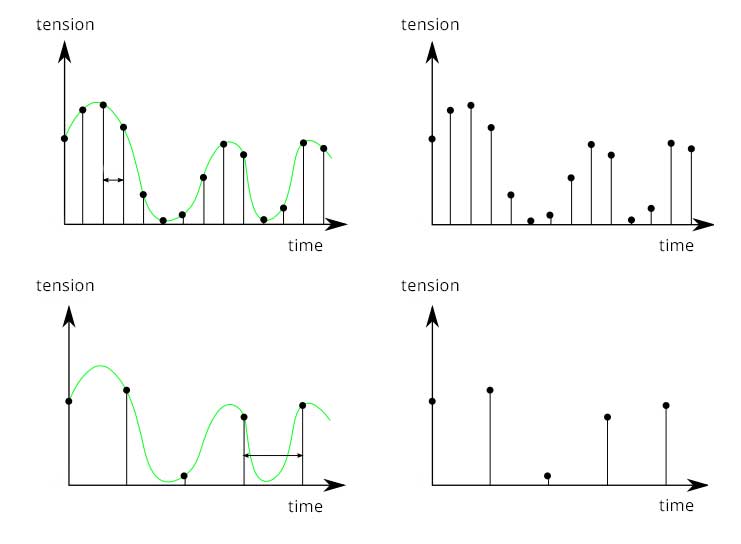
Sampling frequency is calculated using the Nyquist-Shannon theorem and is measured in Hertz (Hz). Common sampling frequencies in digital audio include 44.1 kHz (which is 44,100 samples per second), 48 kHz, and sometimes 96 kHz. Some very specific professional domains use higher values.
Standard sampling frequencies in audio such as 44.1 kHz and 48 kHz were chosen for technical reasons, mainly related to industry standards and certain hardware limitations.
The Nyquist-Shannon theorem details the necessary conditions for sampling an analog signal in order to perfectly reconstruct it from its samples. It states that to faithfully reconstruct an output signal from an input signal, the sampling frequency must be at least twice the maximum frequency contained in the original signal.
If this condition is met, the original signal can be fully reconstructed from its samples without loss of information. However, if the sampling frequency is less than twice the maximum frequency of the signal, sound distortions called aliasing can occur, making signal reconstruction impossible or inaccurate. The theorem helps determine the appropriate sampling frequency for a given signal.
The sampling frequency is based on the frequencies audible to the human ear, typically ranging from 20 to 20,000 Hz. Assuming a sampling frequency needs to be twice the maximum frequency used in the source signal, a sampling rate of 44.1 kHz is sufficient to reproduce frequencies within the audible human audio spectrum.
It’s difficult to hear a difference between a 44.1 kHz sampling frequency and any other higher sampling frequency. The 44.1 kHz sampling frequency remains the standard in audio recording and is used for audio CDs. In this case, the audio is sampled 44,100 times per second during recording. During audio playback, the playback equipment reconstructs the sound 44,100 times per second.
We mentioned that digital conversion involves two steps: sampling and quantization. We’ve just discussed about sampling; now let’s delve into quantization.
Quantization involves determining a numerical value associated with each sample taken by the sampling process. We establish a quantization interval to locate the samples. This allows us to assign a binary basis to each sample, hence the reference to bitrate. The sampling frequency of a digital file is associated with a bitrate.
Not all collected samples contain the same amount of information. The bitrate is the number of bits contained in each sample, i.e., the richness of information in each of these 44,100 audio samples. Here we are referring to audio, but bitrate also serves as a reference in the realm of video.
Below are two examples of coding based on different bitrates. The resulting curves show that the signal quality will vary depending on the bitrate used. The greater the number of bits used to quantify the signal, the more precise the digitization will be.
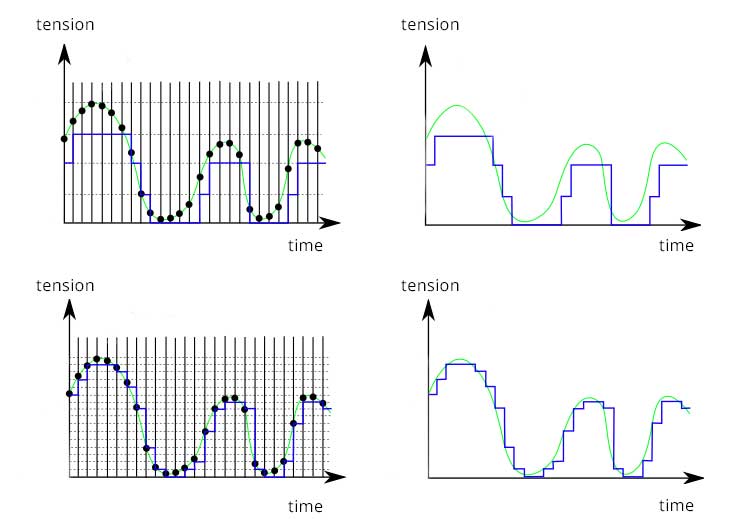
Bitrate is a measure of the amount of digital data transferred or stored per unit of time. It is typically expressed in bits per second (bps), kilobits per second (kbps), megabits per second (Mbps), etc.
A higher bitrate results in better signal quality because it preserves more information from the original signal. This is why we refer to uncompressed, lossless compressed, and lossy compressed audio files.
It’s difficult to hear a difference between a 44.1 kHz sampling frequency and any other higher sampling frequency. The 44.1 kHz sampling frequency remains the standard in audio recording and is used for audio CDs. In this case, the audio is sampled 44,100 times per second during recording. During audio playback, the playback equipment reconstructs the sound 44,100 times per second.
Computer compression involves reducing the size of the information embedded in a file to facilitate its storage, transmission, and reception by third parties. Compression applies to any computer file (audio, video, image, text, etc.) and can be done with or without data loss.
There are many audio file extensions. The most well-known ones are .wav (uncompressed) and .mp3 (lossy compressed). Each file extension corresponds to a type of use. MP3 was designed to limit the space required for an audio file while preserving its quality as much as possible. It is the most widely used format for music on mobile devices or streaming platforms like Spotify. Wav is also used in music but is more common in music production stages (e.g., recording an album). MP3 was created for ease of music listening, while wav is used for music creation.
Uncompressed files are often very large and contain maximum information describing the recorded signal. Extensions in this category include wav, pcm, and aiff.
Lossless compressed files are compressed but in a way that does not alter the recorded signal. Audiophiles who prioritize high-quality sound often prefer these files. They are less voluminous than uncompressed files. Extensions include FLAC (Free Lossless Audio Codec, the most well-known extension), ALAC (Apple Lossless Audio Codec), or WMA (Windows Media Audio).
Lossy compressed files remove some information from the signal to reduce its size. Well-known extensions in this category include Mp3, Ogg, and Aac.
Some extensions are open-source and community-driven, such as Ogg, while others are proprietary, such as Apple’s ALAC or Windows’ WMA.
In the realm of music and video production, the standard choice is typically a bitrate of 24 bits and a sampling frequency of at least 44.1 kHz, as this is the ideal foundation for frequencies audible to the human ear. However, we can enhance quality further by opting for a bitrate of 32 bits and a frequency of 48 kHz. For music production, working at 48 kHz and 32 bits can be beneficial, followed by conversion to 44.1 kHz and 24 bits as needed for final output formats. It’s worth noting that older digital audio physical media and current streaming platforms utilize files at 44.1 kHz – 24 bits.
Consistency is key throughout a project to maintain coherence. Mixing files with different bitrate and sampling frequency values may lead to results containing aliasing and spectral folding. These are distorted parasitic sounds that blend into the final signal by modulating certain frequencies or adding new frequencies that were not originally present.
Using a bitrate lower than 24 bits results in noticeably lower quality, detectable by the human ear. Think back to the 8-bit and 16-bit sounds produced by early video game consoles. In fact, there are dedicated plugins catering to this audio trend, known as retro 8-bit or chiptune plugins.
Some photographs come from Wikipedia and school programs used in physical sciences.
