
Beautiful Plants For Your Interior
Beautiful Plants For Your Interior
Finding your ideal guitar tone is often a never-ending quest. Between tube amps, imposing cabinets, and mic placement, traditional solutions demand time, space, and expensive gear. Fortunately, modern tools can simplify this process. Impulse responses (IRs) and cabinet simulators have emerged as two effective ways to recreate realistic tones without owning dozens of devices. Yet, these two approaches are often confused. An IR is not a simulator, and a simulator isn’t necessarily limited to an IR. Understanding the difference is key to precisely shaping your sound while choosing the solution that best fits your style, budget, and playing environment.
An impulse response (IR) allows you to reproduce a specific sound setup without having to physically use all the equipment. It’s a capture of a set of parameters produced by devices like an amplifier, microphone, or effect pedals, as well as the natural reverberation of a space (a room, church, etc.).
An IR doesn’t reproduce the entirety of an amp. It only reproduces the speaker, the microphone used to record it, and possibly the room where the recording was made. However, the entire preamp and power amp sections are not included in an IR. So, if you’re only using an IR without an amp simulator, you won’t get the same grit or dynamics of a real tube amp, just the rendering of the cabinet and a microphone.
When you create an impulse response, you capture all these parameters and condense them into a small file. This file can then be loaded into an IR loader that will apply it to an audio signal. In the end, the audio signal will have the initial characteristics of all the captured parameters.
You’ll use an IR loader. This can be a small effect pedal, a multi-effects processor with this capability, or a VST plugin.
A cabinet simulator or any other element is a “digital module” that faithfully reproduces the sound of a device. Unlike an IR, the simulator contains the sonic signature of an amp, as well as the entire preamp and power amp sections. It essentially includes everything in one package! However, as the name suggests, it only captures the characteristics of a device, not a location or a musical instrument.
You can find amp simulators that let you choose from a vast library of microphones, speakers, amplifiers, etc. There are small effect pedals dedicated to cabinet simulators or libraries that can be installed on DAWs. Multi-effects processors also use these elements. They offer modules that can be combined in an effect chain to produce a sound. You can combine traditional distortion or reverb effects with amp and mic simulators.
| Impulse Response | Cab Sim | |
| Definition | A capture of the response of an amp, a microphone, a space, or a combination of these elements. | A hardware or software tool that reproduces the sound of a cabinet (often by using IRs or other algorithms). |
| Content | A very short digital audio file (e.g., .wav) containing the “sonic snapshot” of the cab + mic. | A complete module that applies an IR or modeling to your signal. |
| Usage | Requires an IR loader (pedal, plugin, multi-effect). | Directly integrated into a pedal, plugin, or multi-effect. |
| Flexibility | Highly customizable: you can load IRs from different brands, mics, and rooms. | More limited to the options offered by the manufacturer (but it’s often a ready-to-use tool where you just plug and play). |
| Realism | Very faithful to the captured sound, but static (doesn’t reflect the dynamic variations of a speaker). | Can include more dynamics, coloration, or options (depending on the quality of the simulation). |
| Examples | OwnHammer, Celestion, ML Sound Lab, our acoustic instrument IRs, etc. | Two Notes Torpedo, Line 6 Helix, Ampero 2 Stage, Kemper Profiler, Neural DSP Quad Cortex, etc. |
The primary advantage of an IR is that it can reproduce the signal produced by a set of devices, including an amplifier. You can capture the tone of an amplifier alone or that of a complete setup (amp, cabinet, speaker, effect, mic, space). But keep in mind that you don’t have the preamp of an amp.
This is useful for any guitarist who has found an ideal tone. By capturing it, you can reuse it indefinitely without needing the original production conditions. It’s the perfect way to preserve a particular sound. It’s also perfect for reproducing the tone of a guitarist at a specific moment in their career.
When you can reproduce an amp, a cab, and a mic, you understand that the possibilities are almost limitless. IRs give you access to a vast library of devices and therefore of tones. The big advantage of cabinet simulators remains the retranscription of a speaker’s grit and dynamics. In reproducing a tube amplifier, cabinet simulators are the best today!
Just as you capture the characteristics of an amp, you can, with certain methods and processes, capture the characteristics of a space. If you love the natural reverberation of a venue, you can use the IR of that location on your signal and apply its characteristics to your sound. We are talking here about impulse response only. Only an IR can reproduce the characteristics of a space.
Impulse responses also contain the characteristics of acoustic instruments, such as an acoustic guitar. Using the same principle as capturing a space, it’s possible to capture the characteristics of a guitar or a violin. Then, through the same devices or software as for an amp IR, you can apply the characteristics to a signal. This is a process regularly used by players of electric acoustic instruments. Violinists and cellists frequently use impulse response files in their audio signal to simulate the acoustic timbre of their electric instrument. Here too, only an IR can reproduce the reverberation, and therefore the timbre, produced by the body of an acoustic instrument. When you identify modules in effect processors or IR loaders, they are built around an impulse response file.
If you can’t afford a legendary amp head and speakers, use IRs of these elements, or cab sim, to create your own audio signal. You can also mix the tone of two legendary amps in the same signal through blending! The possibilities are so numerous. You can test thousands of combinations!
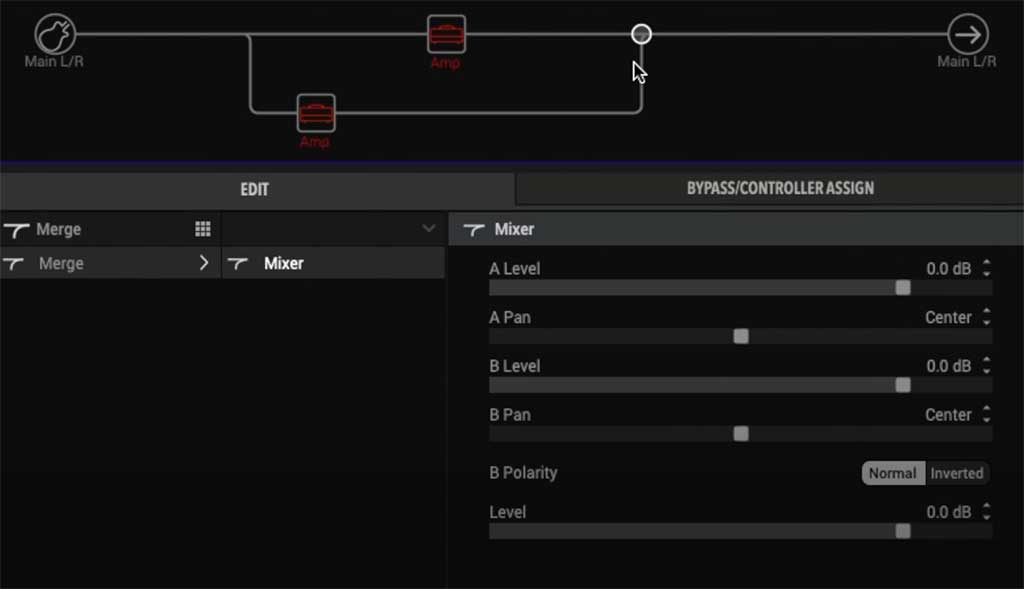
Many musicians create a sound configuration for each song, album, or band. With an effect processor or an amp simulation pedal, for example, you can switch from one config to another in seconds. It’s the same principle as the different effects chains on a multi-effect processor!
In certain playing conditions, musicians are often faced with managing sound volume to avoid feedback and other noise issues. IRs, which already contain a captured microphone, help you avoid this difficulty. You eliminate the mic used to capture the amp, and thus any capture of another mic in that same microphone. Everything is sent to the sound system. It’s also possible to play without a speaker, with an adequate monitoring system. If the simulator also handles microphones, you eliminate the microphone from transport, setup, and the sonic equation. This is an excellent way to eliminate some feedback problems.
Amp simulators free you from transporting an amp on tour. If you have a device capable of simulating your amp, you just need to plug in your instrument and send the sound directly to the mixing board. This is quite liberating when you know how heavy an amp is and how fragile they can be. To know more about ampless rig, please read our article.
A device reacts differently depending on the conditions of a performance. We know that temperature, air pressure, and other parameters influence the quality of audio production by devices. With a cabinet simulator or IRs, you never have to worry about this, because you recall the exact same sound for each concert and broadcast it through the sound system.
Amp simulators are easier to use because everything is already configured. The setup work is simpler than if you go through one or more IRs. Cabinet simulators offer simple, small EQ adjustments. Impulse responses sometimes require more configuration, especially when you use several in the same chain!
Both are practical and allow you to work on your instrument’s tone. It all depends on your budget, the time you want to spend, and your current gear.
First, check your current gear to see if you have a device capable of using impulse response files, or if it offers simulators. If you have a multi-effect processor, chances are it can handle both! In that case, there’s no need to invest, but simply to learn how to configure it to incorporate it into your chain. Almost all multi-effects processors offer amp, cabinet, microphone modules, etc. They also allow the download of third-party impulse responses into the device. From these elements, you can create new effects chains by incorporating these modules and IRs. Check out the ranges offered by brands like Line 6 (Helix Floor, Helix Stomp, Helix POD, etc.), Boss (GT-100, GT-1000, ME90, etc.), Hotone (Ampero 2 Stomp, Ampero 2 Stage, etc.), HeadRush (Core, Prime), or Zoom.
If you are short on time, a pre-configured pedal offering a certain number of cabinets and amplifiers to plug into your guitar seems ideal. It has simple, small settings to perfect your sound. You can also find simple IR loaders and much more advanced devices that allow you to create your own captures, like the Two Notes Torpedo.
There are also VST IR loader plugins that can be used with your DAW (Ableton, Cubase, or ProTools). They can use IRs (in which case they are called IR loader plugins) or offer libraries of devices (cabinets, microphones, amplifiers, amp heads, etc.).
Although different, an impulse response and a cabinet simulator pursue the same goal: to offer the musician a convincing, reproducible sound that is suitable for both the stage and the studio. The IR will appeal to those who like to experiment, test different mics, or explore unique combinations. The simulator, on the other hand, will be reassuring due to its simplicity and quick setup. There is no universal choice, only a solution that is in phase with your needs. Whether you’re a passionate enthusiast looking for rare textures or a touring guitarist in search of consistency, the essential thing remains the same: to find THE sound that accompanies your playing.

