
Beautiful Plants For Your Interior
Beautiful Plants For Your Interior

Impulse responses are all the rage in music and cinema. They allow for the simulation of complex reverberations in locations, devices, and musical instruments. Let’s explore what they are, their advantages, and how they’re obtained.
An impulse response characterizes the behavior of a system when subjected to a brief and sudden stimulation, known as an impulse. This response represents the evolution of the system’s output signal in response to a specific input.
The input impulse is often very short in duration. In contrast, the impulse response can extend over a much longer period, even infinitely in some cases, such as for infinite impulse response (IIR) filters. The difference between the input and the output reveals the intrinsic properties of the system being studied.
Analyzing the impulse response offers a powerful method for understanding and modeling a system by focusing solely on its input-output relationship, without the need for detailed knowledge of its internal structure.
In the world of music, impulse responses have been used for several years. It’s not a truly new technology, but musicians and sound engineers have only recently become aware of their power and usefulness.
An impulse response takes the form of a small audio file, just a few kilobytes in size. It contains the characteristics of an acoustic environment (cathedral, warehouse, hall), a device (amplifier, preamp), or a musical instrument (violin, guitar, cello).
By inserting this small audio file into a DAW or a device dedicated to its application to a source signal (IR loader), the recorded sonic characteristics are applied to the output signal. For example, in cinema, a scene might be recorded against a green screen, and in post-production, the modeled location’s sound reverberation is simulated.
An impulse, a key concept in signal processing, represents a brief and intense disturbance of a system. Mathematically, it’s modeled by the Dirac delta function, an idealized function that has an infinite value at zero and is zero everywhere else, while maintaining a unitary integral.
In practice, an impulse is approximated by a very short duration, high amplitude signal. By sending this signal into a space, its role is to “excite” the frequencies of a system simultaneously. This step is called impulse excitation. The space’s response to this impulse is then observed across the entire sound spectrum. So, a sound impulse is emitted into the system or acoustic space to be characterized. This impulse is typically a very short signal, sometimes even a brief burst of noise.
By sending this impulse, the space’s response is captured using microphones, and through computer processing, an Impulse Response file is generated. This method is used to capture impulse responses of spaces. This response includes not only the direct sound of the impulse but also the reflections and resonances that occur in the environment.
The takeaway is that impulse responses reflect the acoustics of the recorded space. Try a simple test using two impulse responses from very different locations, like a church and a small room. Apply them to the same signal using a convolution reverb plugin, and you’ll hear the difference between the two spaces.
In music, a pink noise or sinusoidal sweep covering all frequencies uniformly over time might be sent. This is primarily used for physical and digital devices like amplifiers, speakers, plugins, etc.
Finally, there’s the particular case of acoustic musical instruments. Here, an impulse is sent through the instrument’s resonating body, and the impulse response is captured. The environment where the capture is done plays a significant role, as its reverberation should be minimized unless the goal is to create an impulse response where the capture space has an impact. This is why impulse responses of acoustic musical instruments are more complex to obtain.
Remember, anything that transforms and alters the propagation of sound has the power of impulse excitation. Any such object can be subject to impulse response capture.
Generally, the number of elements present during the creation of an impulse response is minimized. Each element affects the signal by adding its own characteristics.
Take the example of a cathedral. To create the IR of this cathedral, you need one or more speakers emitting the impulse, one or more microphones capturing the impulse’s reverberation, and a device sending the impulse to the speakers and recording the result via the mics. Multiple speakers or microphones might be used depending on the size of the space and the desire to position microphones in different locations. It’s common to record using several microphone setups to capture different perspectives of the space.
IR files are used in various audio fields such as music production, audio engineering, sound design, and spatial audio. They enable the digital simulation of the acoustics of a place or the sound characteristics of an instrument, which is valuable for creating realistic sound environments, applying realistic audio effects, and optimizing sound reinforcement systems.

As for microphones, there are no strict rules. You can use microphones from the same brand or different brands and/or ranges. Condenser microphones are commonly used for their specific characteristics.
The recording is generally done from a computer using dedicated software. The capture can be done in mono or stereo, across multiple channels, with ambisonic microphones (360° sound), or even in immersive 3D formats like Auro-3D, which offers unique spatialization.
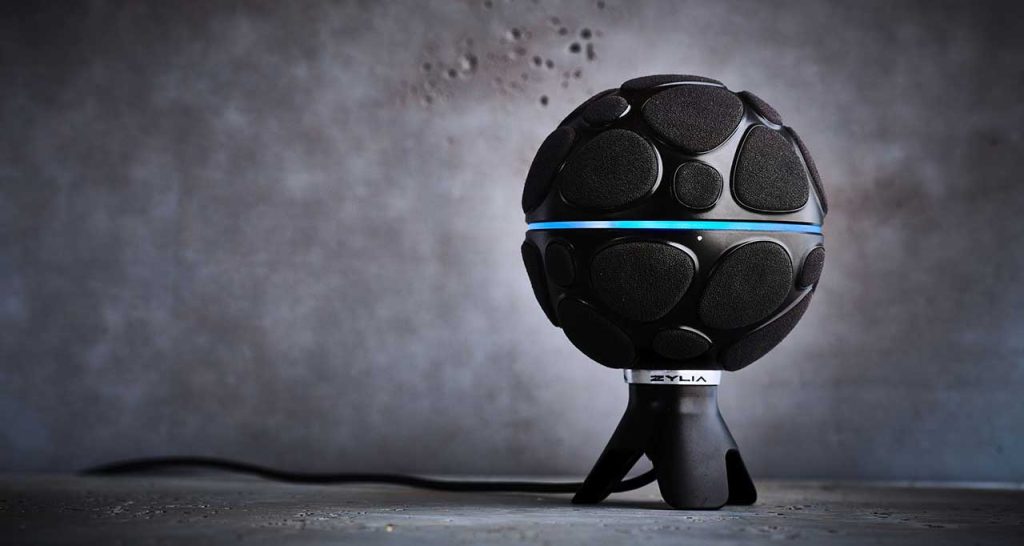
Recording is always done at a minimum of 24 bits, as this is the current standard. If possible, go beyond 24 bits. This is because future technology is unpredictable, and recording at a slightly higher sample rate will likely be beneficial later. Especially since it’s easy to export at a lower bitrate.
As with any recording, the cleaner the capture, the easier the file is to use! Post-processing is never the solution! It’s better to take the time during capture to ensure an excellent recording rather than relying on digital processing. The most important thing is to perform some tests to identify potential noise sources (air conditioning, dimmable lights, ventilation, electrical hum, etc.) and eliminate them.
Before recording, it’s advisable to test microphone and speaker positioning. The capture will inevitably be different depending on their positioning. Results can vary significantly from one position to another!
Once the capture is completed, software is used to adapt the recording to the needs of convolution reverb software, plugins, and devices. Some DAWs, like Pro Tools, can emit the sinusoidal sweep and then interpret the result. On Macintosh, the Impulse Response Utility is frequently used. This is a multi-track recording and deconvolution application associated with effects offered by Logic Pro.
There are also numerous deconvolution plugins that can help generate impulse response files. Among them, some also function as convolution reverb plugins, like Altiverb, which we discussed in a previous article.
Deconvolution is an algorithmic process that reverses the effects of convolution. Convolution is the operation by which two functions are related, suggesting a kind of wrapping of one around the other. It’s a mathematically complex concept involving the multiplication of two different signals to produce a new one.
The deconvolution process is used to create impulse responses from recorded sinusoidal sweeps. Without this step, the recorded files cannot be used as impulse response files. Applying deconvolution to the impulse response is essential.
Other post-processing steps are possible and recommended. This includes eliminating the “rough” part of the spectrum and using audio fades. This typically involves the beginning of the impulse response.
Once processing is complete, the final file is exported. Generally, a .wav file is chosen, as it’s the most commonly used audio format for Impulse Response files. Almost all devices, plugins, and software can import wav files. Some software may produce files with proprietary extensions. It’s always good to have these, but they’re not a priority!
The fundamental principle is therefore to characterize a system or space by evaluating its response to a single sound impulse. This method provides detailed information about the acoustic properties of an environment or system, which is extremely useful in many fields such as audio, acoustic engineering, architecture, etc.

