
Beautiful Plants For Your Interior
Beautiful Plants For Your Interior

Delve into the realm of Hotone multi-effects processors and unleash their full potential with impulse response files, called also IR files. Explore Hotone’s history, understand the significance of IRs, and master the art of integrating them into your effects chain. Elevate your sound and ignite your creativity with this comprehensive guide!
Compared to other brands specializing in the manufacturing of multi-effects processors like Line 6, Boss or Zoom, the company Hotone Audio, commonly referred to as Hotone, is much more recent. Hotone is a Chinese company founded in 2012 by musician and guitarist Guo Runbo.
The company has seen significant growth through the release of numerous products that have found their audience. Hotone Audio produces multi-effects processors, compact pedal models, and control devices for guitars (distortion, expression pedal, MIDI controller – what is MIDI?, IR loader, etc.), as well as amplifiers for guitarists and bassists. Their products benefit from numerous software and technical updates, which have allowed the brand to make its mark in the world of music effects.
We will focus on the effects processors produced by Hotone, specifically, the integration and use of Impulse Response files in these devices. There are several models, but we will dedicate this article to the original versions of the Ampero II Stomp, Ampero II Stage, Ampero, Ampero One, and Ampero Mini. The first two are grouped in the Ampero II series, while the latter three are grouped in the Ampero series (processors of the previous generation).
IR files (Impulse Response files) allow for the simulation of the sound characteristics of a device (amplifier, microphone, etc.), an environment (church, hangar, concert hall, etc.), or the resonance body of an acoustic instrument (violins, violas, acoustic guitars, etc.) without physically owning that element. The transformation of the source signal is achieved through a numerical process. For example, an impulse response file of a cathedral contains all the acoustic reverberation specifics of that location. By using the file in an effects setup, the characteristics of the cathedral are applied to the source signal. The source signal can be produced by a musical instrument or be a recording made in a particular context (films, TV series, cartoons, video games and more).
These files can reproduce the tone of an acoustic guitar, amplifier, or speaker. Electric guitarists love to use Impulse Responses of cabinets and amps in their effects, while acoustic guitarists use them to give an acoustic tone to the sound produced by the piezoelectric pickup of their guitar.
Each multi-effects processor has its own technological characteristics. Hotone Audio’s effects processors have greatly evolved over time. Models like the Ampero, Ampero Mini, and Ampero One use older processors and may not have the same computing capabilities as the latest models like the Ampero II Stomp and Ampero II Stage.
As a result, each processor serie has its own software. Thus, the Ampero, Ampero Mini, and Ampero One use the Ampero Editor software, the Ampero II Stomp and Ampero II Stage use the Ampero II software. Although each software may have slight differences, note that they are essentially similar. Switching between them is extremely simple because Hotone uses the same type of UX interface.
A software update is often linked to a firmware update for the device. First, you need to check that your effects processor has the latest firmware available. The firmware version of your device can be found directly from its interface in the ‘Global / About‘ tab. Next, visit the product page of your processor or the Support section of the Hotone website to download the latest firmware version for your processor and its software. Finally, install everything from your computer following the manufacturer’s instructions!
That’s it! You have updated your Hotone effects processor, and it is now recognized by the appropriate software and your computer.
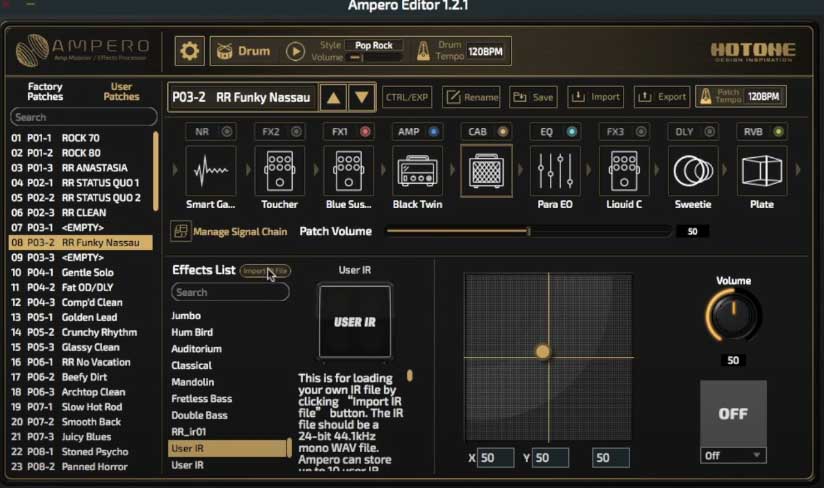
Launch the software and select one of the empty presets. In the list of effects, choose ‘IR‘ and select an empty User IR slot,, then click on the ‘Import IR‘ button. A window will open in order to select your IR file in wav format. Complete the import steps to ensure that your impulse response file is permanently loaded into your processor.
The Ampero II Stomp and Ampero II Stage models accept Impulse Response files with the following characteristics: 24-bit/44.1kHz mono in wav format, with 1024 or 2048 points. You can load up to 50 different impulse response files into these devices.
Below, you’ll find an instructional video to assist you in importing your Impulse Response files. The Ampero II Stomp received a huge upgrade with its firmware 2.0.0. We highly recommend to upgrade your unit in order to benefit from the software and some advantages coming from the Ampero II Stage.
Launch the software and select one of the presets. In the effects chain, click on the ‘CAB‘ effect, then click on the ‘Import IR File‘ button (located above the list of effects provided by Hotone). Next, a window prompts you to select the position and the IR file to import from your computer.
The Ampero, Ampero Mini, and Ampero One processors accept impulse response files with the following characteristics: 24-bit/44.1kHz mono in wav format, 1024 points. Only 10 custom files can be loaded into each unit.
The video below provides additional details on the method of importing Impulse Response files.
Hotone has included various impulse response files of speakers, amplifiers, preamps, microphones, and acoustic instruments (mostly acoustic guitars) in their multi-effects processors. These files can be found in the CAB, AMP, and PRE AMP libraries. Feel free to try them out!
Select an empty preset or start creating a new preset from an existing one.
The advantage of the Ampero II range is that these processors allow you to position effects in the order you want. In contrast, the Ampero models have a predefined order of effects that cannot be rearranged. Ampero II also has the ability to stack multiple IR files in the same effects chain, which is not possible on Ampero Mini, Ampero, and Ampero One.
To use an impulse response with processors from the original Ampero series, simply click on the ‘CAB‘ effect and select the imported IR file.
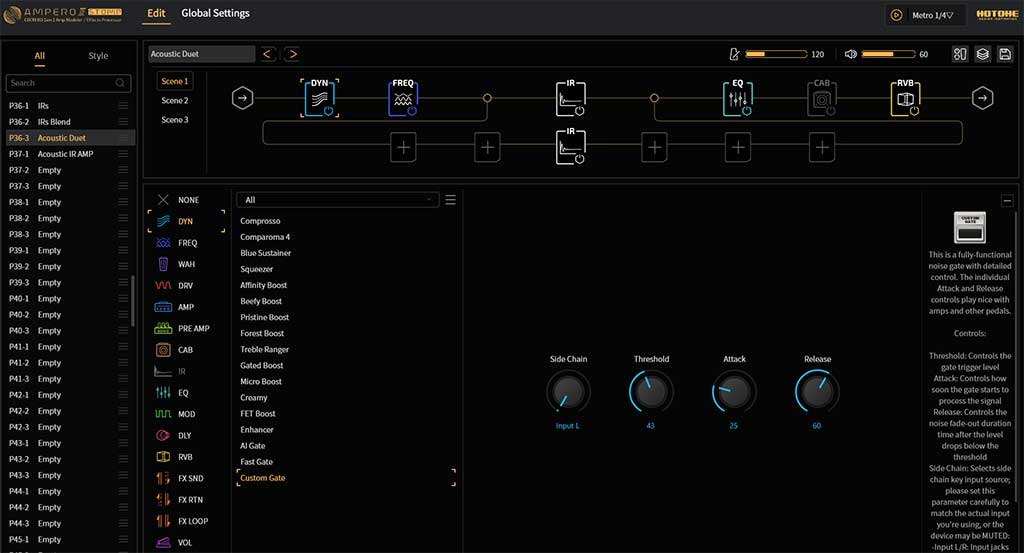
For processors belonging to the Ampero II series, you have the flexibility to position an IR wherever you want. You can also insert multiple IRs in the same effects chain. For example, you can add the IR of an acoustic guitar, the IR of a preamp, and finally the IR of an acoustic amplifier. The possibilities are vast with these types of electronic devices! It’s important to take the time to configure your presets and find a sound that you like!
Below is an example of an effects chain created on an Ampero II Stomp effects processor. It uses an Impulse Response of the famous Martin D-45 acoustic guitar as well as two IRs provided by Hotone.

It’s crucial to fine-tune your audio signal using the other available effects modules. On the Ampero Mini, Ampero, and Ampero One, make good use of the equalizer (EQ), delay (DLY), and reverb (RVB), among others.
With the Ampero II Stomp and Stage, let your creativity flow to envision your preset. There are almost no limitations, except for the processing power of the unit.
If you’re unfamiliar with the concept of blending impulse responses, please refer to our article on this topic. First, note that blending two IR files is not possible on processors in the Ampero series. They lack the computational power required for such calculations and only offer linear preset creation. However, blending IRs is feasible with the Ampero II Stage and Ampero II Stomp. These devices allow signal duplication in the same chain or across two separate linear chains.
Below is an example effects chain combining two acoustic guitar impulse response files: the Martin D-45 and the Martin HD-28. This example is based on two acoustic guitar IRs, but you can also blend two amp IRs or any other combination you prefer.
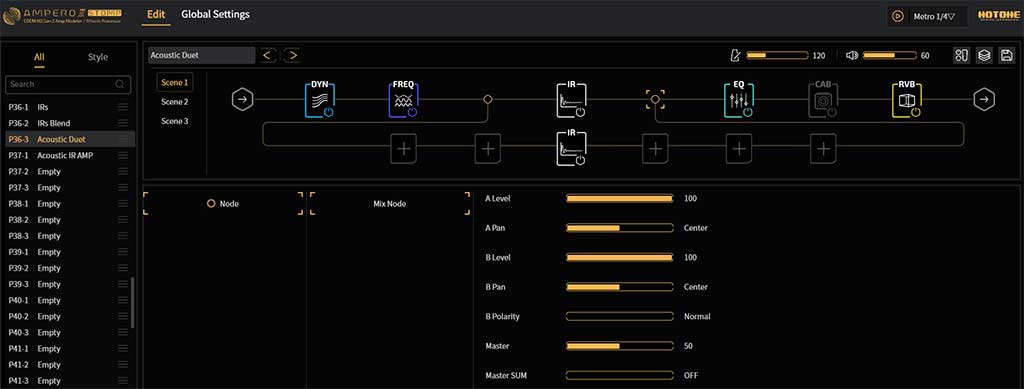
By clicking on the intersections between the two IRs, you can adjust various parameters. At the second intersection, you can manage the phase and polarity of the two signals. You can control the blending between the two Impulse Responses to make one of them more dominant than the other in the final audio signal.
Next, you need to address potential phase issues between the two IR files. Two files with out-of-phase passages will lead to disparities in the audio signal: crackling, decrease in sound level, sound distortion, etc.
Using the intersection module between your two IRs, you will adjust the B Polarity and B Level settings. While strumming your strings, you will play with the B Level slider to identify any signal loss. Once the slider position is determined, modify the B Polarity setting by clicking on it to toggle it from Normal to Reverse. This setting helps achieve coherent phasing between your two IRs. Despite this adjustment, you may still encounter sonic changes. Processors offer many possibilities, but they are still limited by their technological capabilities. Also, IRs are a fantastic way to manage your tone, they are offering fantastic results, but they can’t offer the same result as a real device or environement.
Blending IRs from electronic devices is relatively simpler and less prone to polarity issues than blending acoustic instruments.
It all depends on the audio result you desire! However, generally, an IR is positioned in the logical place where the device would have been if you physically owned it. Thus, an amp IR is typically placed at the end of the effects chain, as it simulates the position of an amplifier. Similarly, an impulse response of an acoustic environment is also placed at the end of the signal chain because it represents natural reverb (the kind you naturally hear in any given space). On the other hand, an impulse response of the body of an acoustic guitar or a cello is placed at the beginning of the chain because the sound capture of the musical instrument occurs before any other element.
These are logical placements to maintain coherent sound production. However, in music, nothing is set in stone, and it’s possible to experiment to achieve a different effect. When creating an effects chain, don’t limit yourself to what you see, hear, or read. Experimentation is the best way to create your own musical universe!
As an example, did you know that the riff from ‘Seven Nation Army‘ was created using a guitar and not a bass? The renowned guitarist Jack White of The White Stripes achieved this sound using his guitar coupled with an octaver and distortion pedals. Yet, upon listening, everyone is convinced that this riff was created by a bass!

